
test
HTML or Hyper Text Markup Language is the outline that structures every webpage you visit. It could be anything from a simple blog to a very advanced e-commerce site. The web would be a disorganized jumble of data without this standard language for creating web pages. You would be surprised to know that more than 95% of websites use HTML for better performance. I have created this blog to help you understand what is HTML and what role it has in web development. Let's take the first step towards learning the art of web creation.
What is HTML?
Hyper Text Markup Language or HTML is an invisible framework that supports everything you see on a web page, including links, pictures, and text. It organizes them with the help of elements and tags that browsers can read. It is important to note that HTML is a markup language, which is different from a programming language.
Now, what's a markup language? This language annotates texts through tags so the web browsers know how to display and structure it. It declares how content should be structured instead of running logical operations like programming languages. Another important point to note is that it defines content but cannot handle interactive behaviour or logic by itself. You can instead use CSS to add styling and layers on JavaScript to make it interactive.
What are HTML Elements?
HTML elements are important components of an Hyper Text Markup Language document that defines a webpage's structure and content. It consists of the following:
| Part | Definition | Example |
|---|---|---|
| Opening tag | It signals the start of an HTML element and specifies its type. It also specifies optional attributes that change its behaviour or appearance. | <p class="intro"> where p is the tag name and class="intro" is an attribute. |
| Content | It can be everything between an element's start and end tags. | in <p>Hello world</p>, the content is Hello world. |
| Closing tag | This one marks the end of an HTML element. It mirrors the opening tag's name but starts with a forward slash inside the angle brackets. | </p> ends a paragraph element. |
Popular HTML Elements
Let's take a look at some popular elements.
| Elements | Description |
|---|---|
| Images | The <img> tag loads an image in a web page by linking to its source. |
| Lists | The <li> tag shows related items as a list in an organized manner. It is either numbered or bulleted. |
| Links | The <a> tag is a connection from one web source to another. The two ends of a link are anchor (clickable part) and direction (where the link leads). |
| Tables | Tables are useful to organize data in columns and rows. This makes information more readable. <table> is the tag for this HTML element. |
| Buttons | The HTML tag for creating buttons is <button>. It designs clickable elements for users to take actions like activating events or submitting forms. |
| Paragraphs | It uses the <p> tag to group related sentences in paragraphs. This improves readability and structure in your content. |
Read Also: Top 8 Frontend Languages - A Beginner's Guide
What is an HTML Tag?
An HTML tag is another important component to define the content of a page. You can see it as a keyword that comes in enclosed angle brackets (<>) and pairs. Look at the table down below to understand it better -
| Tag | Description |
|---|---|
<html> |
This tag is the main container of an HTML document. |
<p> |
A paragraph is defined using the <p> tag. |
<ol> |
This tag is used to create an ordered list in HTML. |
<ul> |
This one on the other hand represents an unordered list. |
<a> |
This tag stands for 'anchor' and it used to create a hyperlink. |
<body> |
It defines the main content of a webpage that is visible to users. |
<head> |
It defines metadata about a webpage which provides detailed related to the author, content and more. |
<img> |
This tag displays images like photos, logos, etc. |
<table> |
It defines a table to display data in columns and rows. |
<form> |
This tag creates a form that collects user input on a webpage. |
Examples of HTML Tags
Let's take a look at some practical examples-
1. <html>
This is the outermost container of an HTML document. Everything else like head, body, content, etc., goes inside this tag. It tells the browser "this is an HTML file."
|
2. <p>
It is used to group together text into a paragraph and It creates a block of text separated from other content.
|
3. <ol>
This makes a list where the order matters and items are automatically numbered. Each list item inside needs to be
wrapped in <li>.
|
4. <ul>
It creates a list of items where order doesn't matter and items are typically shown with bullets instead of numbers.
Also uses <li> for each item.
|
5. <a>
This is used for hyperlinks. You wrap text (or elements) inside <a> and give it an href attribute pointing
to another page or resource. That makes the wrapped content clickable.
|
6. <body>
The <body> tag defines the main content of an HTML page, everything that you see when you open a webpage (text,
images, links, lists, tables, etc.) lives inside <body>.
|
7. <head>
<head> helps browsers and search engines understand what your page is. This includes its title, how it should
behave, how it should be displayed.
|
8. <img>
Inserts an image into the page. You need a src attribute (to say where the image file is) and usually an alt
attribute (alternative text if image fails or for accessibility). It's a self-closing tag (no closing </img>).
|
9. <form>
It wraps input elements to collect user input data. Data inside the form (input fields, etc.) can be sent to a server
or processed when submitted. Forms usually include things like <input>, <button>, etc.
|
Read Also: Top Backend Languages For Web Development
What Are HTML Attributes?
Attributes are special pieces of information added to HTML elements. They provide extra details or instructions to the browser about how an element should behave or appear. They always appear inside the opening tag of an element and are written as name-value pairs.
HTML's power lies not just in its elements and tags. When you start building real web pages, you will rely on attributes and proper syntax to control and enhance the content. Let's understand how to use them perfectly.
Basic Syntax of HTML Attributes
|
Attribute Name: Tells the browser what kind of information you're specifying (e.g., href, src, alt, class).
Attribute Value: The value or instruction for that attribute, always enclosed in quotes.
Example
|
Here, href is the attribute that tells the browser where the link should go.
Key Points
- Attributes are always added to the opening tag.
- Multiple attributes are separated by spaces.
- Attribute values should be in double or single quotes.
- Some attributes (boolean attributes) don't require a value (e.g., disabled, checked).
Syntax Rules in HTML
Proper syntax ensures your HTML works reliably across all browsers and devices. Here are the main rules to follow:
1. Tags
Most elements have an opening tag and a closing tag. Some, like <img>, are self-closing.
|
2. Nesting
Tags should be properly nested—open and close them in the correct order.
|
3. Case Sensitivity
HTML tags and attributes are not case-sensitive, but using lowercase is the recommended standard.
4. Quoting Attribute Values
Always enclose attribute values in quotes, especially if they contain spaces or special characters.
5. Void Elements
Some elements do not require closing tags or content.
|
What Is Semantic HTML?
Semantic HTML refers to the practice of using meaningful HTML elements that clearly describe their purpose in a web
page. Unlike generic tags like <div> or <span>, semantic elements provide structure and meaning to
browsers and assistive technologies.
Why Is Semantic HTML Important?
Using semantic HTML improves clarity, accessibility, SEO, and maintainability. Elements like <header>, <nav>, <main>,
<article>, and <section> help define the page's structure.
Examples of Semantic Elements
|
Semantic vs Non-Semantic Elements
Semantic elements describe the meaning of their content. Non-semantic elements do not.
|
Use semantic elements whenever possible to create well-structured, meaningful web pages. Reserve <div> and
<span> only when no suitable semantic element exists.
History of HTML
Let's go through a brief history of Hyper Text Markup Language through the given table. It is an invention of Tim Berners-Lee, an English computer scientist who also invented the World Wide Web. He brought this creation to share and organize documents on the web.
| Released Year | Version | Description |
|---|---|---|
| 1993 | HTML 1 | The first basic and limited version which introduced paragraphs, headings and links. |
| 1995 | HTML 2 | The second version with added support for forms and tables. |
| 1997 | HTML 3 | This one came with support for applets, scripting with JavaScript and styling with CSS. |
| 1999 | HTML 4 | It introduced better multimedia support and accessibility features. This version also brought separation of content and presentation. |
| 2012 | HTML 4.01 | It did not add any new features but included fixing some issues. It was a minor revision of the previous version. |
| 2014 | HTML 5 | This one is the most latest and advanced version with new elements and better support for web applications. |
What are Web Browsers?
What are web browsers? Definitely something that you come across and use everyday. A web browser is an application that allows you to access, receive and view content on the World Wide Web (WWW). It shows web pages written in HTML along with JavaScript and CSS (Cascading Style Sheets). A web browser is the mediator between you and the internet you use for almost everything. Some popular examples are Firefox, Safari, Google, Mozilla, etc. Any of them can be used to open a '.html' file and check out the results.
How Are HTML, CSS and JavaScript Related?
HTML is used to add textual elements and define the structure of the content. It is yet not sufficient enough in itself to build a professional and fully responsive website. It works with JavaScript and Cascading Style Sheets (CSS) to achieve that.
CSS takes care of design aspects like spacing, animations, layouts, background, etc. JavaScript brings interactive functionality to the site like photo galleries and sliders. HTML, CSS, JavaScript are the main foundations of front-end web development.
Real-Life Example: Creating a Sign-Up Page
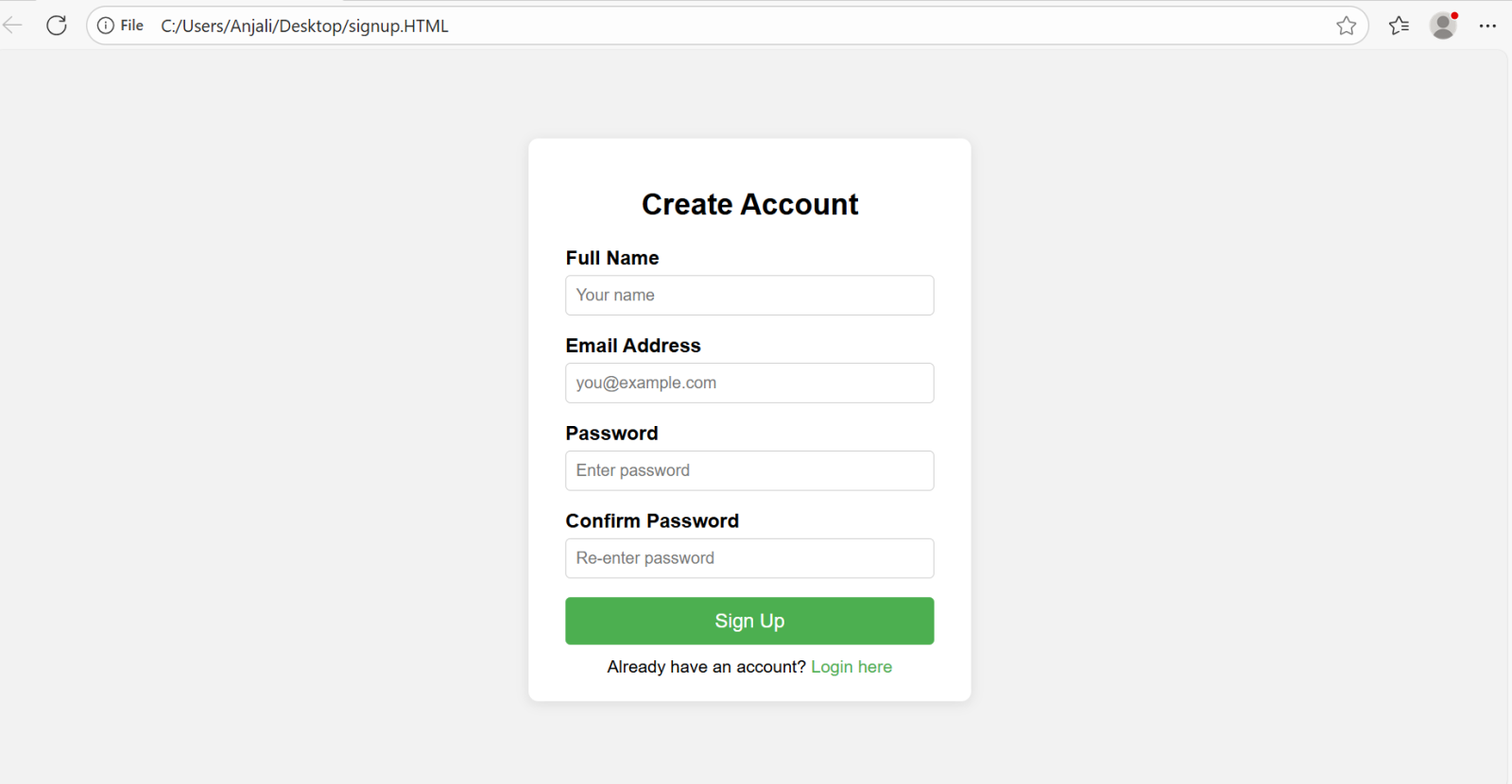
Let's take a look at this real-life example I have created for you by creating a sign-up page using HTML and CSS-
|
Explanation
The first thing I did after creating this code was copying and pasting it on a notepad. I saved it as a document named 'signup.html'. After that I ran this code in my browser and received the output that I have given down below.
Output
This is what the output looks like -
HTML Features
Let's discuss some key features to highlight its goodness and purpose in web development.
| Features | What it does |
|---|---|
| Styling and scripting support | It can be merged with JavaScript for better interactivity and CSS for styling. This results in the creation of visually appealing webpages. |
| Multimedia support | Enhance user experience by embedding videos, images, audios and much more to your webpages using HTML. |
| Content organization | It gives you a clear structure by organizing images, texts, links and other elements on a webpage. |
| Cross platform compatibility | It works across different browsers and devices to make sure that a wide audience get access to the content. |
| Hyperlinks | This allows for navigation between different websites or pages by creating links. |
| Geolocation API | This allows users to share their location with websites so that they can get location based services like local search and map. |
| Drag and drop API | Users are free to drag and drop elements within the webpage. It facilitates interactive interfaces like sortable lists and file uploads. |
| Cross document messaging | This feature ensures safe communication between different origins through this messaging system between documents. |
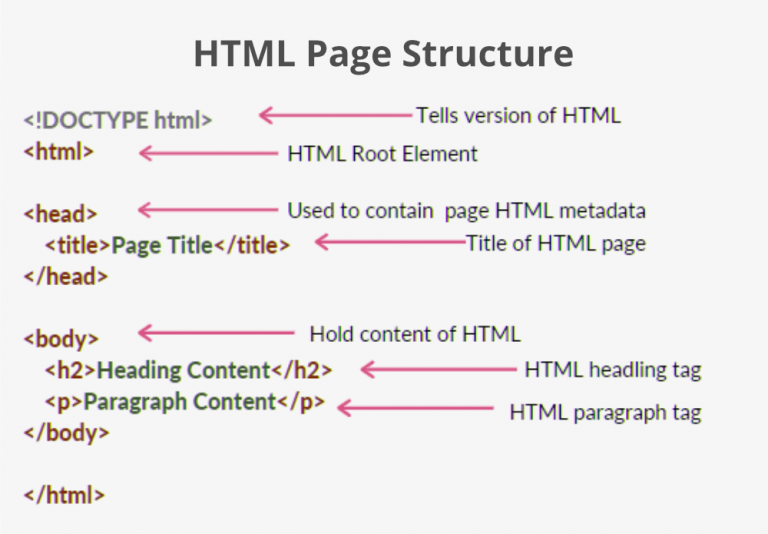
How Does HTML Page Structure Look?
Why learn HTML?
There are a number of advantages to learning HTML and applying it in real time scenarios. Let's see what are those -
Achieve Creativity
Put your creativity and imagination into designing and structuring attractive web pages.
Better Career Opportunities
Learning this markup language will take you to different domains of digital marketing, web development, content management and much more. It would be easier to come by good job opportunities with higher wages.
Understanding How the Web Functions
You will get to step into the world of the internet and learn how it works, how the web pages are structured and how users interact with them.
Independence
The best thing about learning HTML is that it will give you the ability to create your own website or blogs. It means there is no need for you to depend on developers to make it happen. This is beneficial for anyone who wants to learn HTML but especially professionals like freelancers and content creators wanting to work independently.
Programming Knowledge
Learning this language will come with getting familiar with other programming languages like JavaScript and CSS. This gives you a chance to strengthen and expand your programming knowledge.
Advantages and Disadvantages of HTML
It is also important to know both advantages and disadvantages of HTML to put it into best use. Let's start with some advantages -
Advantages
Here are the advantages of HTML -
- Ease of Use: This language is beginner-friendly with a simple syntax, making it easy to learn and use for creating web pages.
- Universal Compatibility: Supported by all web browsers, ensuring consistent rendering across platforms like Chrome, Firefox, and Safari.
- Flexibility: Integrates seamlessly with CSS for styling and JavaScript for interactivity, enabling dynamic and visually appealing websites.
- Cross-Platform: Works on desktops, mobiles, and tablets, supporting responsive design for various screen sizes.
- Free and Open: No cost to use, with extensive documentation and community support available.
- SEO Support: Its semantic structure (e.g.,
<header>,<footer>) improves search engine indexing and visibility. - Multimedia Integration: Easily embeds images, videos, and audio, enhancing user engagement.
- Fast Loading: Lightweight code leads to quicker page load times compared to complex frameworks.
Disadvantages
Let's discuss the disadvantages of HTML -
- Limited Interactivity: It alone cannot handle dynamic functionality or complex interactions without JavaScript or other technologies.
- Static Nature: Primarily designed for static content, requiring additional tools like CSS and JavaScript for advanced features.
- Browser Inconsistencies: Older browsers may not support newer HTML5 features, leading to compatibility issues.
- Security Limitations: It is vulnerable to issues like cross-site scripting (XSS) if not properly secured with server-side validation.
- Verbose Code: Complex layouts, like those in HTML emails, often require cumbersome table-based structures or inline styling.
- Maintenance Challenges: Large HTML projects can become difficult to manage without proper organization or frameworks.
- No Logic or Processing: HTML lacks built-in logic for calculations or data processing, relying on backend languages like PHP or Python.
- Accessibility Concerns: Poorly structured HTML can hinder accessibility for screen readers if semantic tags or ARIA roles aren't used.
Conclusion
It is safe to conclude that HTML (HyperText Markup Language) is the foundational language of the web, enabling the creation and structuring of content across all websites. Its simplicity, universality, and adaptability make it an essential skill for anyone interested in web development. By understanding HTML, you unlock the ability to build accessible, responsive, and interactive web pages that function seamlessly across devices and browsers.
FAQs: What is HTML
Q1. Why is HTML important?
HTML is important because it forms the backbone of all websites, allowing browsers to display text, images, links, and other content properly.
Q2. Is it easy to learn HTML?
Yes, HTML is beginner-friendly, and with practice, anyone can start building web pages in a short time.
Q3. What are the common uses of HTML?
HTML is used to create webpage structure, add text and images, create links, design forms and embed multimedia like audio and video. It forms the basic foundation of every website.
Course Schedule
| Course Name | Batch Type | Details |
|---|---|---|
| HTML Training | Every Weekday | View Details |
| HTML Training | Every Weekend | View Details |